

Is your Bonsaii C149-C shredder acting up by running continuously? This common issue can disrupt your workflow and leave you wondering what went wrong. But don’t worry; troubleshooting this problem is simpler than you think. Based on the official instruction manual, this comprehensive guide will walk you through the possible reasons and their solutions.
When a shredder keeps running, it is usually due to a malfunctioning sensor or foreign objects triggering the machine. The Bonsaii C149-C has safety features and sensors designed to detect paper and operate accordingly. However, even small issues can interfere with this mechanism.
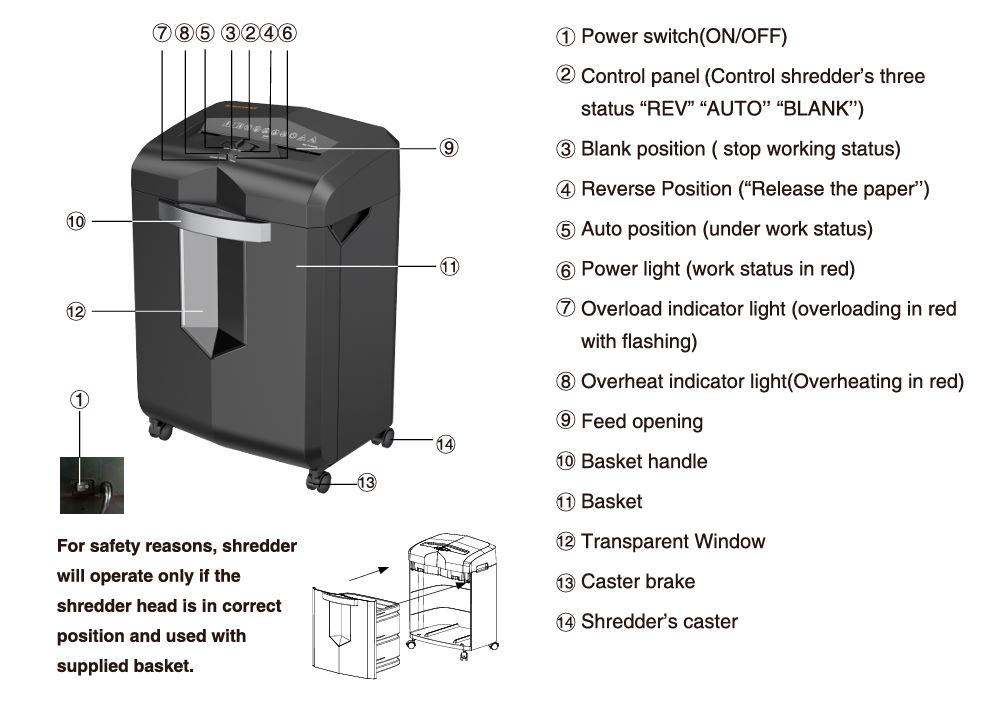
Bonsaii C149-C Shredder Keeps Running: Potential Causes and Solutions
1. Paper Dust or Foreign Objects Blocking the Sensor
Cause: Sensors near the feeding opening may accumulate paper dust or be obstructed by small particles.
Solution:
- Turn off and unplug the shredder. This step ensures safety during cleaning.
- Use a soft, dry cloth to clean the sensor area thoroughly. Avoid using water or any liquid cleaners as these can damage the electronics.
- Check the shredder for any stuck paper fragments or debris and remove them carefully.
2. Basket Not Properly Installed
Cause: The Bonsaii C149-C is designed to stop working when the shredder head isn’t securely attached to the basket.
Solution:
- Ensure the shredder head is properly aligned with the basket.
- Check that the transparent window is free of debris and that the basket is not overfilled.
3. Jammed Paper Triggering the Reverse Mechanism
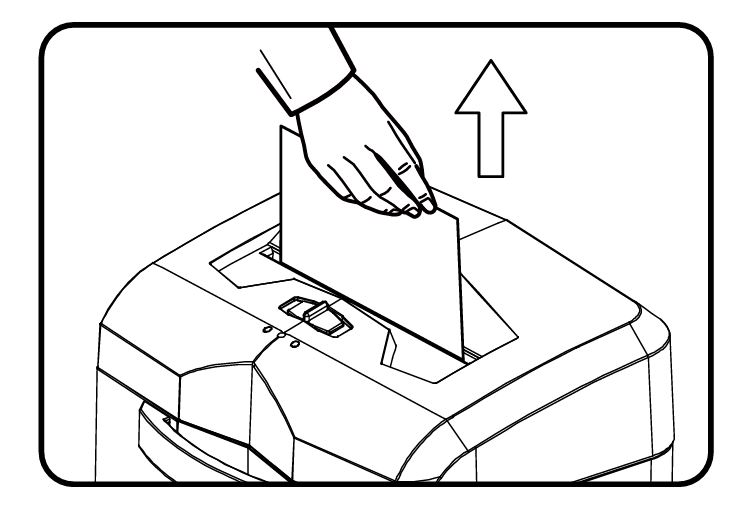
Cause: Overloading the shredder or inserting inappropriate materials can cause a jam, which might activate the motor.
Solution:
- Move the control panel to the “REV” (Reverse) position for 3-5 seconds to dislodge the jammed paper.
- If the jam persists, repeat the process 2-3 times.
- Remove any visible paper manually if safe to do so.
4. Overheating Issues
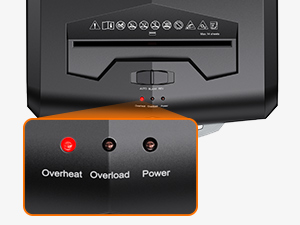
Cause: Continuous shredding can cause the shredder to overheat, activating safety mechanisms that keep it running.
Solution:
- Check the overheat indicator light. If it’s red, let the shredder cool down for at least 20 minutes before using it again.
- Avoid exceeding the machine’s duty cycle to prevent overheating in the future.
5. Damaged or Misaligned Power Cable
Cause: A damaged power cable or loose connection can cause the shredder to malfunction.
Solution:
- Inspect the power cable for visible damage.
- If damaged, replace the cable with one that matches the manufacturer’s specifications. For safety, contact customer support for assistance.
6. Machine Defects
Cause: Internal defects or wear and tear might lead to abnormal behavior.
Solution:
- If the issue persists after troubleshooting, contact Bonsaii customer support via email at customer-care@bonsaii.com or call 1-844-728-6917.
- Provide a detailed description of the problem, including pictures or videos if requested, to help diagnose the issue.
Tips for Preventing Future Issues
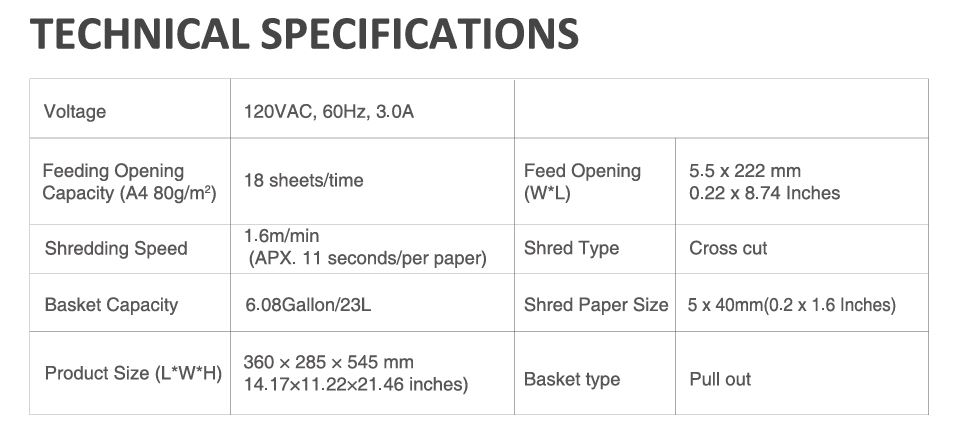
- Follow the Capacity Limits: Do not shred more than 18 sheets of paper at a time. Overloading can stress the motor and sensors.
- Use Proper Materials: Avoid shredding adhesive tape, plastic film, carbon paper, or any prohibited materials listed in the manual. These can jam the blades or damage the sensors.
- Regular Maintenance:Lubricate the shredder regularly using professional shredder lubricant packs like Bonsaii’s 24-Pack/12-Pack. Follow these steps for lubrication:
- Empty the Basket Frequently: A full basket can interfere with the shredder’s operation. Make it a habit to check and empty the basket regularly.
- Avoid Prolonged Use: The Bonsaii C149-C has a continuous run time limit. Allow it to rest after shredding to avoid overheating.
FAQs
Why does my Bonsaii shredder keep running even after I’ve turned it off?
This issue could be due to dust or small particles covering the sensor. Turn off the shredder, unplug it, and clean the sensor area.
Can I use water or household cleaners to clean my shredder?
No, you should avoid using water or any liquid cleaners. Stick to a dry, soft cloth for cleaning.
How can I contact Bonsaii customer support?
You can reach them at customer-care@bonsaii.com or call 1-844-728-6917. Have your order details ready for faster assistance.
When to Seek Professional Help
If none of the above solutions work, it might be time to involve professionals. Bonsaii offers excellent customer service and warranty support. Here’s how you can benefit:
- Replacement Parts: If any components are defective, Bonsaii will provide replacements under warranty.
- Technical Support: Their team can guide you through advanced troubleshooting steps.
Final Thoughts
The Bonsaii C149-C is a reliable shredder with heavy-duty capabilities, but like any machine, it requires proper care and maintenance. By understanding the reasons behind the “keeps running” issue and applying the suggested solutions, you can ensure smoother operation and longer-lasting performance.

If the problem persists, don’t hesitate to reach out to Bonsaii’s customer support. With these tips, you can get back to shredding documents effortlessly and maintain the productivity you need.